Skip to content
SEO Cockpit

SEO analytics for Search Console and GA4

Understand SEO. Spot problems. Make decisions.

Google Search Console, GA4, indexing, alerts and reports in one cockpit.

Access is currently by invitation.

SEO Cockpit overview: KPIs, performance trend and average position of a real website

Built on

  • Google Search Console
  • GA4
  • URL Inspection
  • Sitemaps
  • Alerts
  • Weekly reports
  • PDF reports
  • MCP

The problem

SEO data is scattered.

Performance sits in Search Console, traffic in Analytics, indexing in single URL checks, and reports are assembled by hand. Connections between these signals are easy to miss.

  • Search Console
  • Analytics
  • Indexing
  • Reports
  • Alerts
  • Manual checks

SEO Cockpit brings these signals together in one interface — per site, with history.

Features

Six modules, one workflow.

Every module works with data stored from Google — and shows how each number is calculated.

  • Search performance

    • Clicks, impressions, CTR, average position
    • Winners and losers vs. the previous period
    • Queries, pages, devices, countries
    • Content groups and topic clusters
  • Opportunities

    • CTR opportunities based on the site's own CTR curve
    • Ranking changes
    • URL allocation and possible cannibalization
  • Indexing

    • URL inspection results
    • Last crawl and Google canonical
    • Sitemaps with status
    • Change history per URL
  • Analytics

    • GA4 sessions and engagement
    • Organic landing pages
    • Channels and sources
    • Key events and AI referrals
  • Alerts & reports

    • Persistent, rule-based alerts
    • Weekly report by email
    • SEO report as PDF
    • Same numbers as in the dashboard
  • ChatGPT / MCP

    • Read-only access to your own SEO data
    • Structured queries via MCP
    • Same services as the dashboard, no separate logic

No black box

No black-box scores.

SEO Cockpit shows measurements, not verdicts. You can trace every number back to its source.

  • Traceable metrics from Search Console and GA4
  • Transparent, documented rules and thresholds
  • No artificial health or SEO scores
  • No invented cause claims — texts describe what the data shows
  • Clicks and sessions are kept apart as different measurements

Product

The dashboard, as it is.

Real screens from the product, with real data from one website.

01

Overview

KPIs with comparison, performance trend, average position, winners and losers — and what needs attention first.
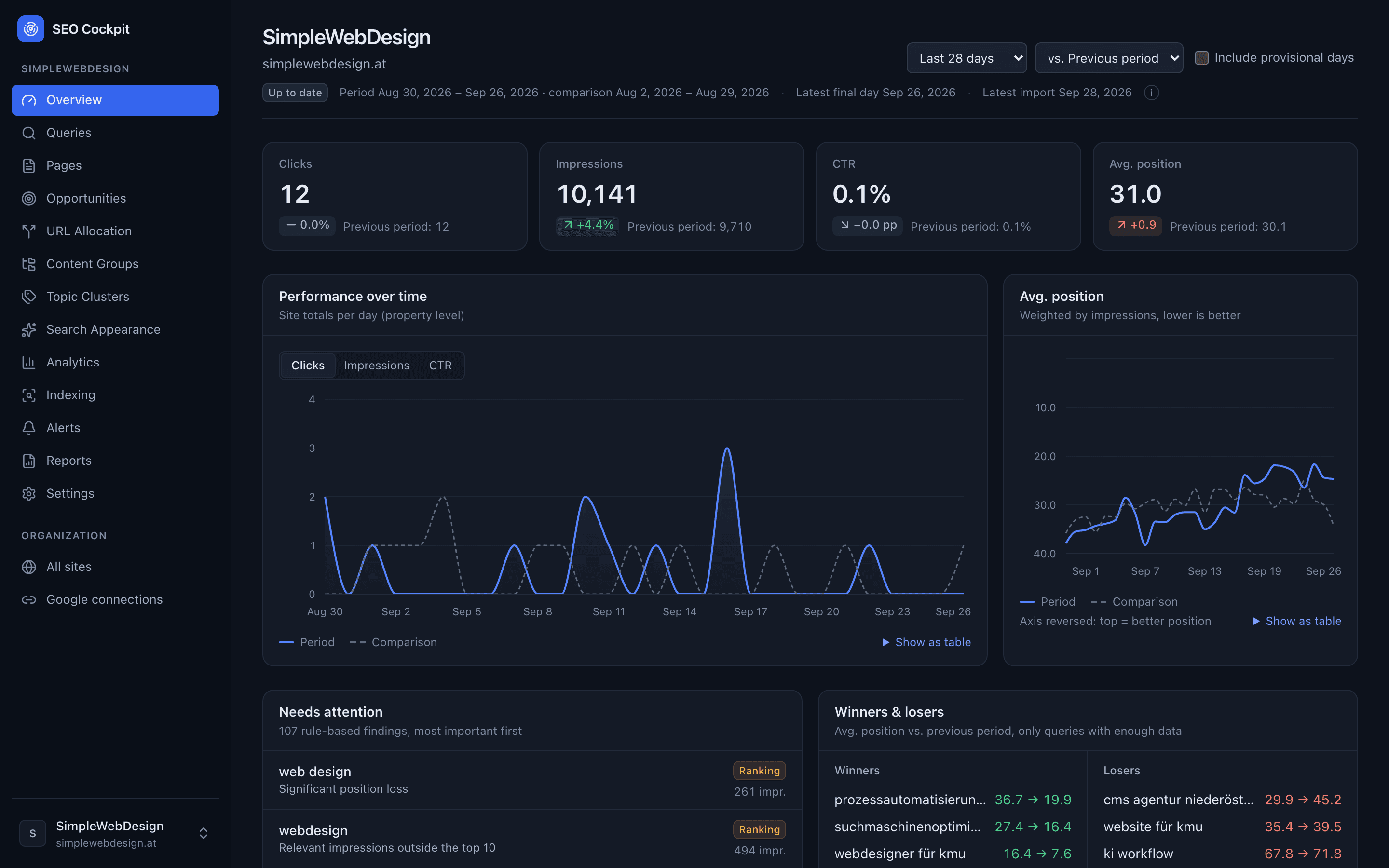
Overview with KPI cards, performance chart and average position

02

Queries

Filter by impressions, clicks, position, brand or topic cluster. Each query opens a detail panel with its ranking pages.
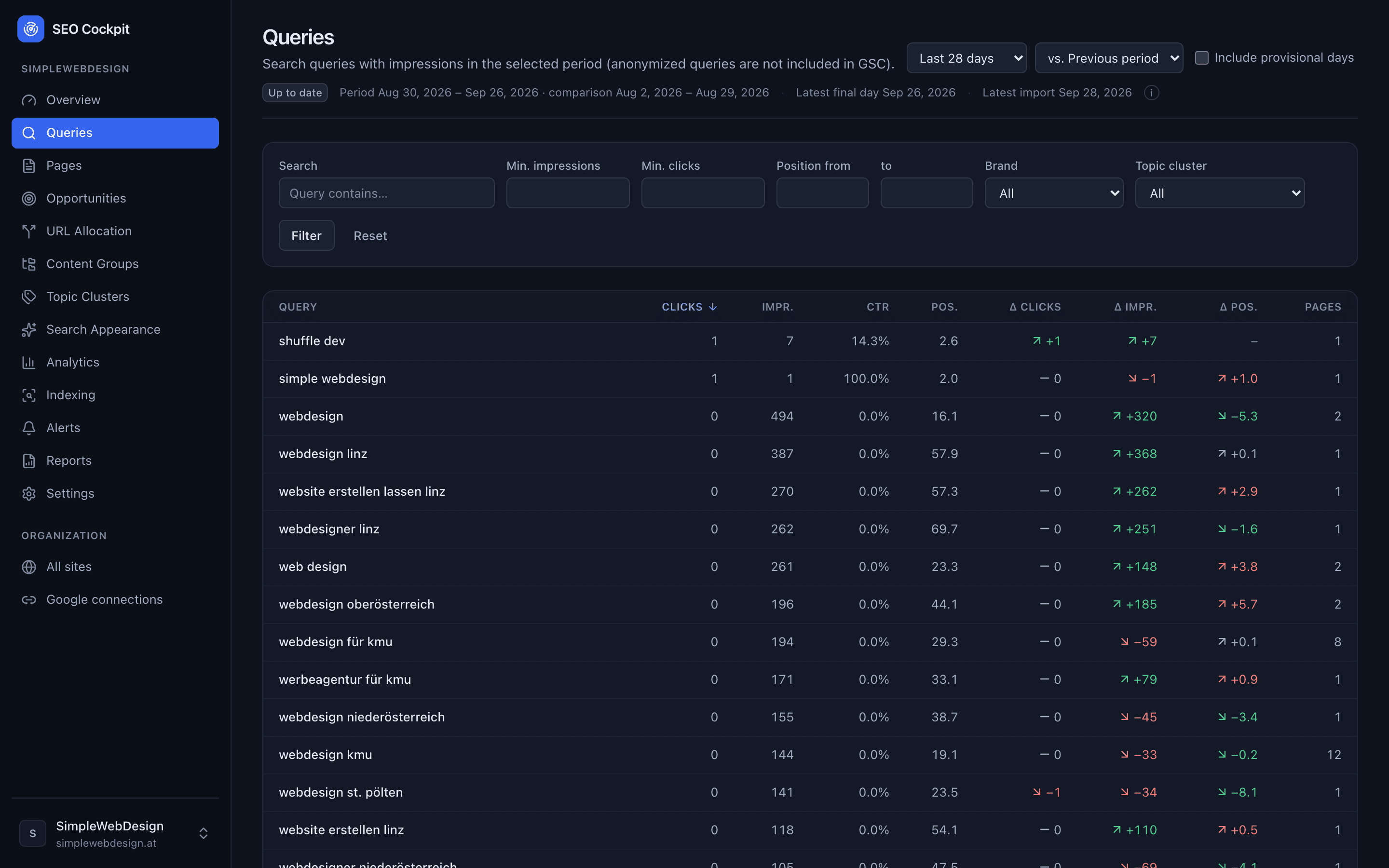
Query table with clicks, impressions, CTR, position and changes

03

Indexing

Stored URL inspection results, sitemaps and changes over time — always with the date of the last inspection.
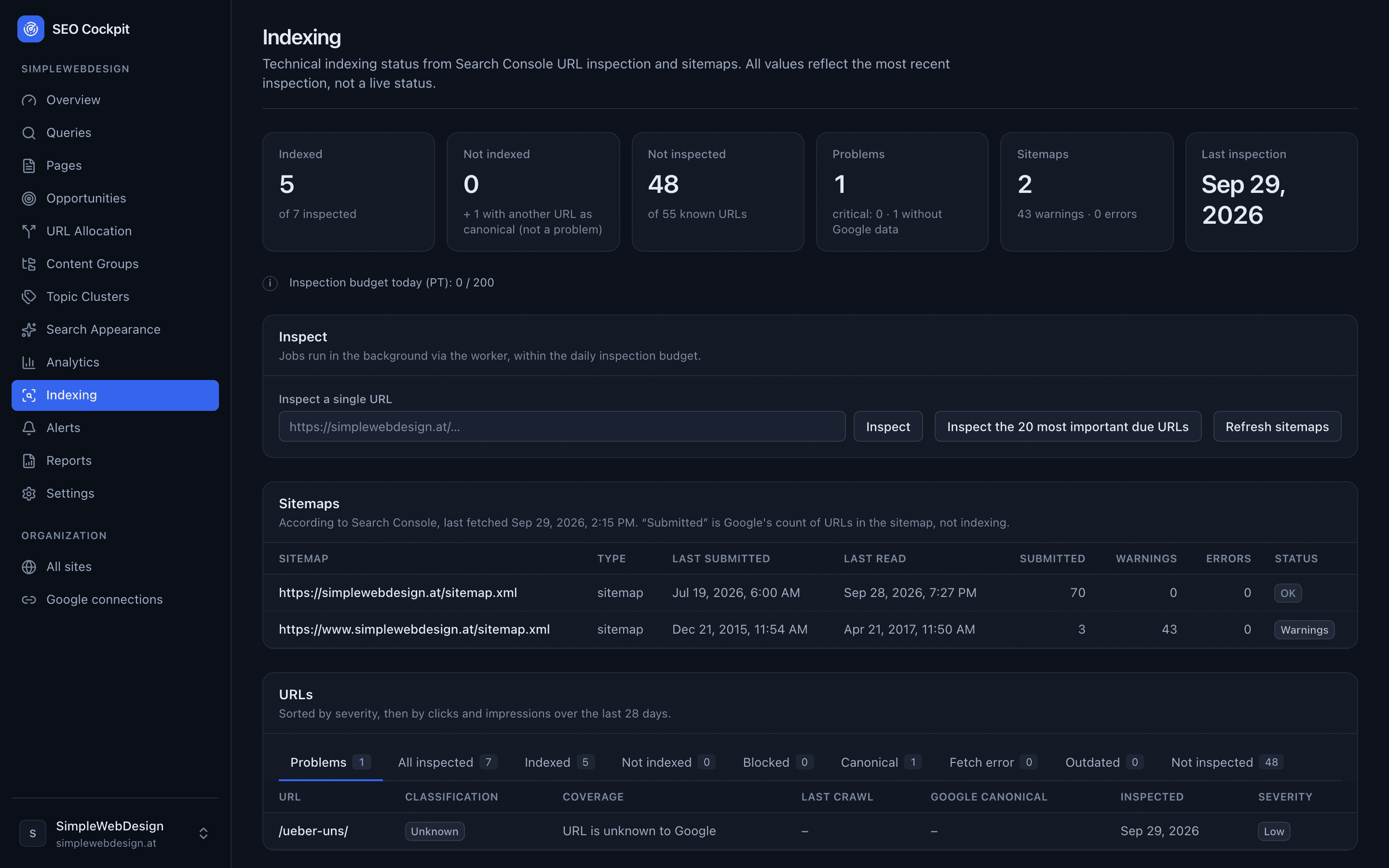
Indexing overview with inspection status and sitemaps

04

Analytics

GA4 sessions, organic landing pages, channels and key events next to Search Console data — without mixing the two.
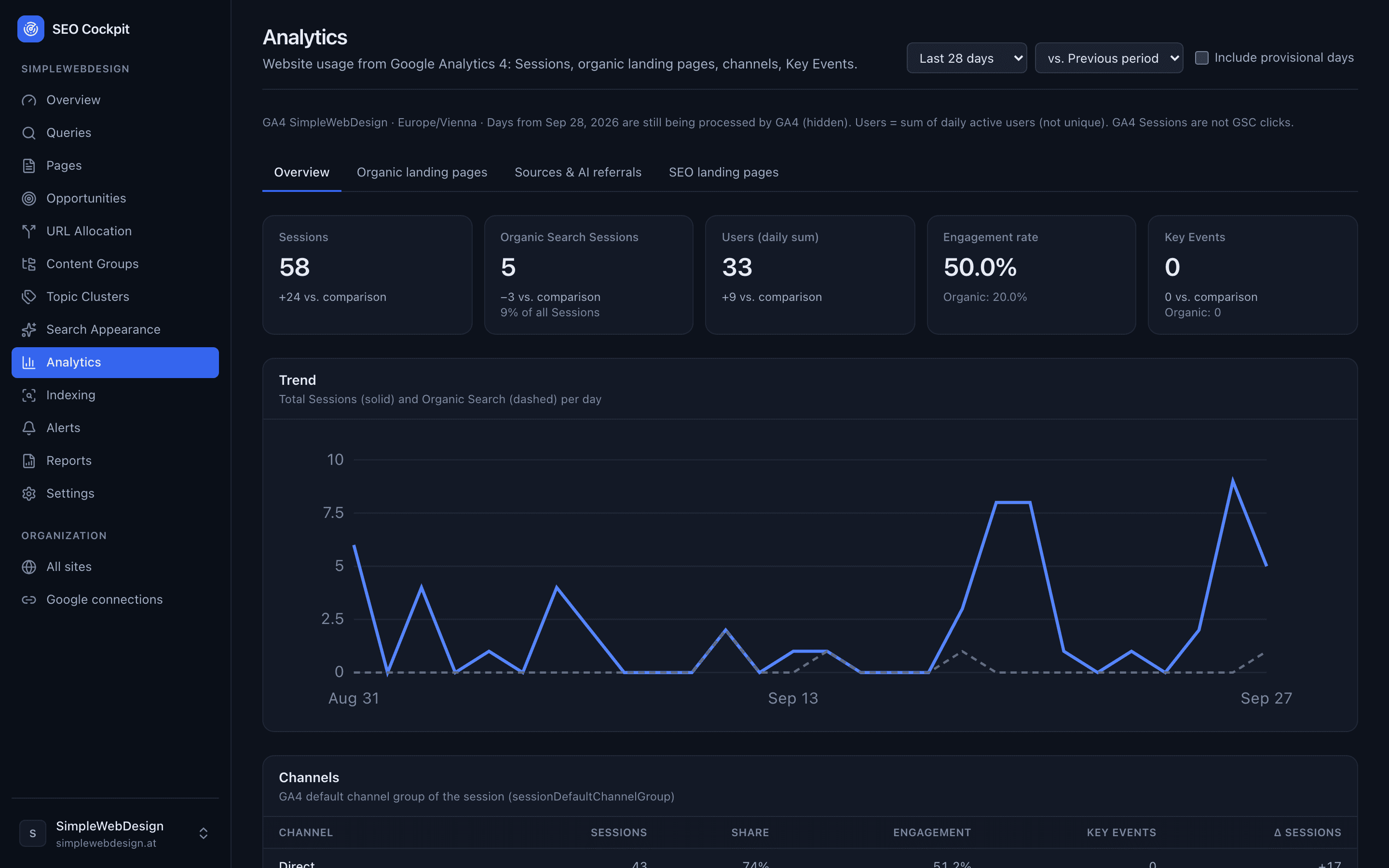
GA4 analytics with sessions, engagement rate and channels

05

Alerts & reports

Rule-based alerts with evidence, a weekly report by email and a PDF report for clients.
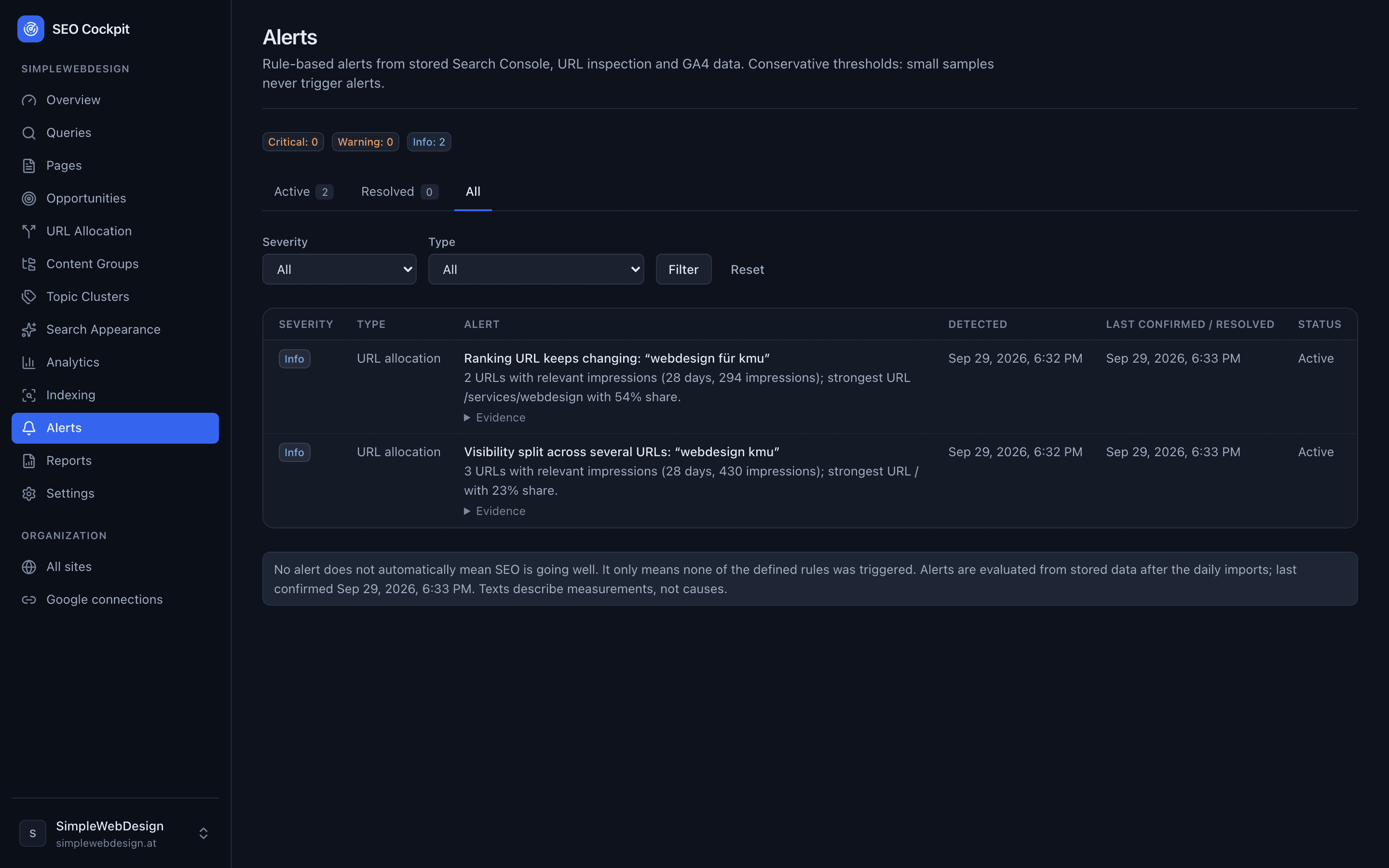
Alert list with severity, type and evidence

How it works

From connection to decision.

  1. Connect Google

    Connect a Google account with read access to Search Console and, optionally, GA4.

  2. Assign a site

    Choose the Search Console property — and optionally the GA4 property — for each website.

  3. Import data

    Up to 16 months of Search Console history are imported, then updated daily.

  4. Spot opportunities and problems

    Opportunities, ranking changes, URL allocation and indexing issues in one place.

  5. Use reports and alerts

    Weekly report by email, PDF reports and alerts after each daily import.

  6. Ask ChatGPT (optional)

    Query the same data read-only via MCP from ChatGPT or other MCP clients.

Who it's for

For people who work with SEO data.

  • Freelancers

    Monitor your own and your clients' websites — every site with its own reports and alerts.

  • Agencies

    Manage several organizations and websites, each with its own members and roles.

  • Small businesses

    Understand the important SEO signals without a tool zoo — in German or English.

Pricing

One price per active website.

Full feature set, no tiers or packages. The total is the price per active website times the number of active websites in your organization — websites with a connected Google Search Console property.

Several websites? The price simply scales per active website.

  • Monthly

    €9.99

    / month per active website

  • Yearly

    €99.90

    / year per active website

    2 months free (≈ 16.7 %)

  • 7 days free
  • No credit card required
  • Full feature set

Included modules

  • Search performance, queries and pages
  • Opportunities and URL allocation
  • Indexing: URL inspection and sitemaps
  • GA4 analytics
  • Alerts, weekly report and PDF reports
  • MCP access for ChatGPT and other clients
Sign inFor invited users

Security & privacy

Read-only by design.

  • Read-only Google scopes

    Only read access to Search Console and GA4. SEO Cockpit cannot change anything in your Google accounts.

  • Encrypted tokens

    Google access tokens are stored encrypted (AES-GCM) and are separate from the app login.

  • Tenant isolation

    Every query is bound to one organization. Members only see the sites of their own organization.

  • Own data history

    Imported data is stored in SEO Cockpit's own database, so history stays available beyond Google's windows.

  • MCP is read-only

    MCP tokens belong to one organization, can be revoked and cannot write anything.

FAQ

Frequently asked questions

Which data does SEO Cockpit use?

Google Search Console (performance data, sitemaps, URL inspection) and, optionally, Google Analytics 4. The data is imported and stored, then analyzed in the dashboard.

Do I need GA4?

No. Search Console is enough for all search reports. GA4 adds sessions, landing pages, channels and key events.

Can I manage several websites?

Yes. An organization can contain several websites, and a user can belong to several organizations.

Can I connect several Google accounts?

Yes. Each organization can connect several Google accounts; each website uses the property of one of them.

What is the difference between GSC clicks and GA4 sessions?

Clicks are counted by Google Search; sessions are measured by GA4 on your website across all search engines and depend on tracking and consent. They are different measurements and are deliberately shown side by side, not reconciled.

Are my Google connections read-only?

Yes. SEO Cockpit only requests read-only scopes for Search Console and GA4.

Can I create reports?

Yes. An SEO report for any period (HTML and PDF) and a weekly report that can be sent by email automatically.

Can I use SEO Cockpit with ChatGPT?

Yes, via MCP: an owner or admin connects ChatGPT with their SEO Cockpit sign-in and approves read-only access to one organization; the connection can be removed at any time under “Connected apps”.

Is SEO Cockpit available in German and English?

Yes. The interface, reports and emails are available in both languages. The language follows your browser and can be changed at any time.

How does login work?

With a sign-in link sent by email — no password. Access is currently by invitation.

SEO data in one place, finally.

Search Console, GA4, indexing, alerts and reports — traceable and per website.